
Friday, 7 Aug 2026
Subscribe
States Top Leading News States Top Leading News
  • Home
  • Videos
  • Categories
    • Local News
    • Editorial
    • Business
    • Education
    • Entertainment
    • Finance
    • General
    • Lifestyle
    • Health
    • Technology
    • Politics
    • World
    • Press Releases
    • Shop
  • Services
    • Submit Guest Posts
    • Press Release Distribution
    • Biz Directory
    • Video Press Release
  • Career
  • Donate
    • GoFundMe
  • About
    • Domain Authority
    • Disclaimer Page
    • Staff Directory
    • Published Pages
    • Investor Inquiries
    • Contact
Font ResizerAa
STL.NewsSTL.News
Search
  • Home
  • Videos
  • Categories
    • Local News
    • Editorial
    • Business
    • Education
    • Entertainment
    • Finance
    • General
    • Lifestyle
    • Health
    • Technology
    • Politics
    • World
    • Press Releases
    • Shop
  • Services
    • Submit Guest Posts
    • Press Release Distribution
    • Biz Directory
    • Video Press Release
  • Career
  • Donate
    • GoFundMe
  • About
    • Domain Authority
    • Disclaimer Page
    • Staff Directory
    • Published Pages
    • Investor Inquiries
    • Contact
Have an existing account? Sign In
Follow US
© States Top Leading News. All Rights Reserved.

Home » Technology » Triple Screen Portable Monitor for Laptop USB-C Plug and Play Extended Screen Compatible with MacOS, Windows, Android

Technology

Triple Screen Portable Monitor for Laptop USB-C Plug and Play Extended Screen Compatible with MacOS, Windows, Android

Smith
Last updated: September 20, 2025 6:29 am
Smith - Editor in Chief
Share
primary 5
SHARE

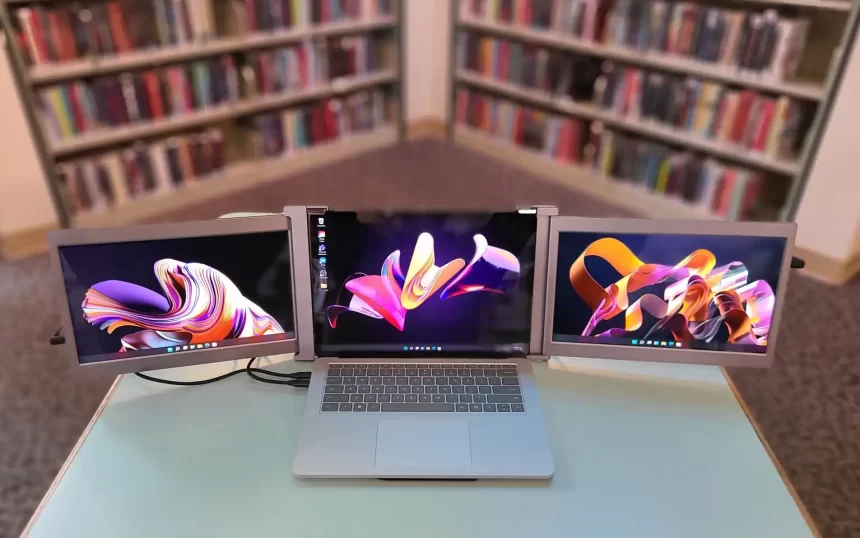
For professionals, students, and digital nomads alike, one of the biggest challenges of working on the go is screen space. Most laptops, even the high-end models, offer limited real estate, forcing constant window-switching and workflow interruptions. The QQH Z80A Laptop Screen Extender is designed to address this problem, offering a portable dual 15.6-inch display setup that expands your laptop into a full tri-screen workstation.

Contents
Ultra-Slim Dual 15.6” FHD IPS DisplaysSturdy Aluminum Alloy BuildOne-Cable Plug-and-Play SetupMulti-Mode Productivity BoostWide Compatibility Across DevicesUser Controls and Memory FunctionPractical Considerations

In this review, we’ll explore the design, features, compatibility, and performance of the QQH Z80A to see whether it’s a practical solution for those looking to increase efficiency while maintaining mobility.

Ultra-Slim Dual 15.6” FHD IPS Displays

The standout feature of the QQH Laptop Screen Extender is its pair of 15.6-inch FHD IPS displays. Each screen boasts:

  • 1920×1080 resolution for crisp and sharp visuals
  • 178° viewing angle ensuring consistent colors from nearly any perspective
  • 300 nits brightness for indoor and moderate outdoor use
  • 1200:1 contrast ratio that enhances depth and detail
  • 0.15-inch ultra-slim profile that keeps the setup light and portable

For anyone accustomed to working with a single laptop screen, the jump to three displays dramatically improves multitasking, whether you’re handling spreadsheets, editing documents, or running creative software.

811blcdm9UL. AC SX679

Sturdy Aluminum Alloy Build

Unlike traditional attachable multi-screens that clip onto your laptop and can stress hinges, the QQH Z80A is freestanding. Built with an upgraded aluminum alloy body using a CNC cutting process, it offers both durability and sleek design.

This freestanding approach means:

  • No damage or wear to your laptop’s screen or hinges
  • Easy setup behind the laptop without awkward mounting brackets
  • Increased flexibility to position the displays as needed

The 360° rotation and 90° built-in stand further enhance adaptability, making it possible to adjust screen positions depending on workspace or collaboration needs.

One-Cable Plug-and-Play Setup

Connectivity is simplified with a single USB-C or USB-A cable, provided your device supports full functionality. While a driver installation is required, once completed, setup is straightforward:

  • Connect via USB-C for modern laptops with full-featured ports
  • Use USB-A with the included adapter for compatibility with older devices
  • Reduce desk clutter thanks to the one-cable design

Portable triple monitor setup with QQH Z80A aluminum alloy design

It’s important to note that some corporate work laptops may block driver installation. In such cases, the QQH extender is best suited for personal devices where software installation is unrestricted.

Multi-Mode Productivity Boost

The QQH Z80A offers four different modes that cater to various work and entertainment needs:

  1. Extended Mode – Spread out applications across three screens for seamless multitasking.
  2. Mirror Mode – Duplicate your laptop’s display for presentations or teaching.
  3. Presentation Mode – Rotate and share content directly with others during meetings.
  4. Second Screen Mode – Use one or both additional monitors independently.

With these modes, users can achieve up to 300% productivity improvement. For example, professionals can keep email on one screen, documents on another, and a browser or data sheet open on the third—minimizing wasted time switching between tabs.

104 1041397 buy it now on amazon

Wide Compatibility Across Devices

Compatibility is one of the QQH extender’s strongest selling points. It works with:

  • Windows laptops
  • macOS (including M1, M2, M3, and M4 chip models)
  • ChromeOS devices
  • Android devices with display output support

However, installing the driver is necessary to unlock full dual-screen functionality. Once installed, the extender integrates seamlessly with most systems.

User Controls and Memory Function

Each screen includes dedicated control buttons to adjust brightness, contrast, and color temperature, allowing customization for specific environments. Additionally, the built-in memory function saves your settings, so you don’t need to readjust every time you power it on.

This attention to detail ensures a personalized and consistent viewing experience, particularly useful for those working in varying light conditions.

Practical Considerations

Before purchasing, it’s important to understand a few limitations:

  • Driver installation is required. If your laptop does not allow new software, functionality will be limited.
  • Compatibility is best with 12–16” laptops. Larger or smaller devices may not align well with the display size.
  • Freestanding design means extra desk space. While highly stable, users will need room behind their laptop to set it up.

For mobile workers who often set up in cafés, co-working spaces, or client offices, these trade-offs are relatively minor compared to the efficiency gained.

Share This Article
Twitter Email Copy Link Print
By Smith Editor in Chief
Follow:
Martin W. Smith is the founder and Editor-in-Chief of a digital media network that includes STL.News, STL.Directory, St. Louis Restaurant Review, STLPress.News, USPress.News, and more. Managing a global publishing team, Smith oversees editorial strategy and content curation across the entire network. To support this high-volume operation, he engineered a proprietary RSS aggregation infrastructure capable of importing, managing, and filtering thousands of daily press releases. Since its launch in February 2016, STL.News has published more than 250,000 articles. Smith is a member of the United States Press Agency (Reg. #31659) and a certified member of the US Press Association (Reg. #802085479).
Best Webhost

Your Trusted Source for Accurate and Timely Updates!

Our commitment to accuracy, impartiality, and delivering breaking news as it happens has earned us the trust of a vast audience. Stay ahead with real-time updates on the latest events, trends.
FacebookLike
TwitterFollow
PinterestPin
InstagramFollow
Google NewsFollow
LinkedInFollow

Popular Posts

A 300-Year-Old Law VS Modern Sportsbooks

A 300-Year-Old Law VS Modern Sportsbooks: The Statute of Anne vs. D.C.’s Betting Industry (STL.News)…

By Smith

Missouri’s growing online gaming industry

Virtual gaming in Missouri is experiencing a significant boom, captivating players statewide.  With numerous platforms…

By Smith
Business Loans
States Top Leading News States Top Leading News
Facebook Twitter Pinterest Apple Google

About STL.News

Boost your brand with STL.News. Publish high-impact Press Releases and secure essential local Business Directory Listings to maximize your online visibility, reach target audiences instantly, and drive powerful growth across St. Louis and beyond, and connect with more loyal customers. Visit our Google Listing or visit our Google News page.

  • Marty@STLMedia.Agency
  • 417-529-1133
  • 36 Four Seasons Shopping Center # 310 Chesterfield, Missouri 63017 United States

© Copyright 2026 – St. Louis Media LLC dba STL.News – All Rights Reserved.

adbanner
AdBlock Detected
Our site is an advertising supported site. Please whitelist to support our site.
Okay, I'll Whitelist
Welcome Back!

Sign in to your account

nineteen + 20 =

Lost your password?